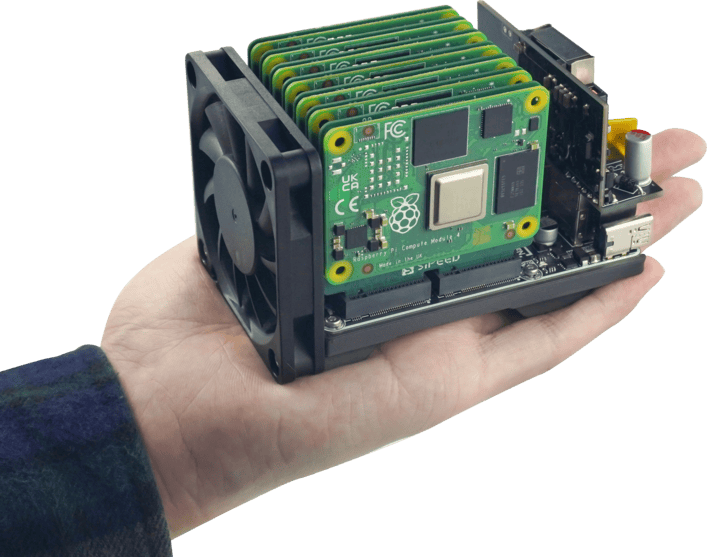
Over the weekend, I learned about the existence of the Sipeed Nano Cluster.
It’s a neat concept, and these are my notes on what I’ve learned so far.
NOTE: This is a collection of research notes. I do not actually own this hardware.
What Is It?
From the official source:
NanoCluster is an ultra-miniature cluster board developed by Sipeed, featuring 7 SOM slots interconnected
via a RISC-V-based Gigabit switch. It supports USB-C PD power supply and optional PoE expansion. Additionally,
NanoCluster provides independent UART and power control, making it an ideal entry-level platform for HomeLab
users exploring distributed computing, Kubernetes, Docker, and edge computing.
Use Case
I currently run a 3-node Proxmox cluster on older Intel NUCs. While I have no immediate plans or desire to replace that setup, I was curious how a Nano Cluster might stack up as a potential alternative or learning platform.
NOTE: I’m relatively new to Proxmox and learned during this research that Proxmox does not natively support ARM. However, there is a fork called Pimox. If I ever decide to pull the trigger on one of these setups, I’d likely give Pimox a try.
Observations & Learnings
One early observation is that most of the online material was produced while the Nano Cluster was still in pre-release. Based on the dates of the videos I watched, I suspect this device was released sometime in the second half of 2025, which makes it a relatively new product.
I also struggled a bit to understand the bare minimum parts required to get up and running. There are pre-made kits available on AliExpress, but AliExpress does a terrible job of clearly listing what’s included. I spent a large portion of my research time just figuring out what hardware is actually required to give this thing a test drive.
Cost
I’m not someone who goes top-end or maxes everything out—I tend to stick to the middle of the road. With that in mind, I wanted to understand what it might realistically cost to experiment with this setup.
As far as I can tell, there are only two places to buy this right now:
I’ve never used Taobao, and when I followed the link everything was in Chinese and required signing up—so that’s a hard pass for me. All cost analysis below is based solely on AliExpress pricing.
Packages
Buried under the Description tab (and presented as a non-searchable image) is a breakdown of the available packages:
Packages
| Package | Price | Included | Not Included |
|---|---|---|---|
| Basic Package | $49.00 | Dock Board Cooling system (fan) Case / shell | Power supply Compute modules |
| CM45 Package | $99.00 | Dock Board Cooling system (fan) CM4 / CM5 adapters (carrier boards) Case / shell | Power supply Compute modules |
| 7× LM3H Package | $299.00 | Dock Board Cooling system (fan) 7× LM3H SOMs (4GB RAM + 32GB eMMC) Case / shell | Power supply CM4 / CM5 adapters (not needed for LM3H) |
| 4× M4N Package | $699.00 | Dock Board Cooling system (fan) 4× M4N SOMs + adapters (8GB RAM + 32GB eMMC) Case / shell | Power supply |
Individual Components
| Component | Price | Notes |
|---|---|---|
| USB-to-4-UART adapter cable | $5.00 | Likely used for serial access and debugging; not strictly required for basic operation |
| 65W USB-C PD power supply + cable | $15.00 | Primary recommended power option |
| 60W PoE power adapter | $20.00 | Optional alternative power source if using PoE |
| LM3H SOM (4GB RAM + 32GB eMMC) | $35.00 | RISC-V-based compute module |
| M4N SOM (8GB RAM + 32GB eMMC) + adapter | $164.00 | Higher-end compute module; requires adapter |
MVP
The MVP (Minimum Viable Product) appears to be:
- Power supply
- Dock Board
- Cooling system / fan
- 1× LM3H (4GB RAM + 32GB eMMC)
It does not appear possible to buy the Dock Board on its own, so even if you already had a fan, there doesn’t seem to be a way to save a few dollars there. You can, however, bring your own power supply.
| Item | QTY | Unit Cost |
|---|---|---|
| Basic Package | 1 | $49.00 |
| LM3H 4+32 | 1 | $35.00 |
| Total | $84.00 |
So, excluding taxes and shipping, you could technically be up and running for $84.00. That said, this would give you a single node—which kind of defeats the purpose of a cluster. Still, it could be a low-cost way to get a feel for the platform before committing further.
MVP: Actual Cluster
A single-node setup isn’t very compelling, so let’s look at what it would cost to run a more reasonable 3-node cluster. Three nodes are generally considered the minimum for any quorum-based clustering solution. We’ll also assume we do not already have a compatible power supply.
| Item | QTY | Unit Cost | Subtotal |
|---|---|---|---|
| Basic Package | 1 | $49.00 | $49.00 |
| LM3H 4+32 | 3 | $35.00 | $105.00 |
| Power Supply | 1 | $15.00 | $15.00 |
| Total | $169.00 |
Pi 5 Cluster (Comparable)
For comparison, let’s look at a 3-node cluster based on Raspberry Pi 5 Compute Modules.
Pricing here uses the CM5104032, which includes 4GB of RAM and 32GB of eMMC, roughly aligning it with the LM3H modules above.
| Item | QTY | Unit Cost | Subtotal |
|---|---|---|---|
| CM45 Package | 1 | $99.00 | $99.00 |
| CM5 Module | 3 | $63.00 | $189.00 |
| Power Supply | 1 | $15.00 | $15.00 |
| Total | $303.00 |
Pi 5 Bare Bones
Sticking with Compute Module 5 for a moment, what if we choose the absolute lowest-end option: CM5002000, which has 2GB of RAM and no eMMC storage, relying instead on an SD card?
| Item | QTY | Unit Cost | Subtotal |
|---|---|---|---|
| CM45 Package | 1 | $99.00 | $99.00 |
| CM5 Module | 3 | $45.00 | $135.00 |
| Power Supply | 1 | $15.00 | $15.00 |
| Total | $249.00 |
It’s not entirely clear what you’d realistically run on a cluster with only 2GB per node. To be fair, this compute module is likely intended for smaller IoT-style projects—but, at least in theory, it is an option.
Conclusion
While this is a neat little setup, I don’t think I’ll be pulling the trigger on it.
If I were to do it, I’d likely go with the LM3H 4GB + 32GB configuration—but not as a pre-built package.
The package pricing feels odd to me. The 7× LM3H package is listed at $299.00 and includes:
- The base dock ($49.00)
- 7× LM3H modules at $35.00 each ($245.00)
That totals $294.00, which is actually $5.00 cheaper than the package price.
Given this, there’s very little incentive to buy the bundle. If I were going to try this out, I’d buy the Basic Package for the dock and then add three LM3H modules. If I liked it and wanted to expand later, I’d buy four more LM3Hs.
Yes, that means paying shipping twice, and I’d probably end up spending a little more overall if I expanded to all seven nodes—but that feels like a reasonable hedge against paying an extra $140 up front for hardware I don’t yet have a solid use case for.
References
- AliExpress Listing
- Sipeed Wiki
- https://github.com/geerlingguy/raspberry-pi-pcie-devices/issues/739
- Various YouTube Videos:
- https://www.youtube.com/watch?v=gnf5tlO5ct4
- https://www.youtube.com/watch?v=zocjWPxCZog (this is the one that started the rabbit hole)
- https://www.youtube.com/watch?v=pu5PlXzqRLI
- https://www.youtube.com/watch?v=V4YgKFF7siI
- https://www.youtube.com/watch?v=tUugLXidiHw
- https://www.youtube.com/watch?v=_1ownVbp8Qw
- https://www.youtube.com/watch?v=Swj9teOXmao
- https://www.youtube.com/watch?v=X4blR5Ua3S0
- https://www.youtube.com/watch?v=JYe_GRV2OQ8
- https://www.youtube.com/watch?v=UEtpaiODNs0